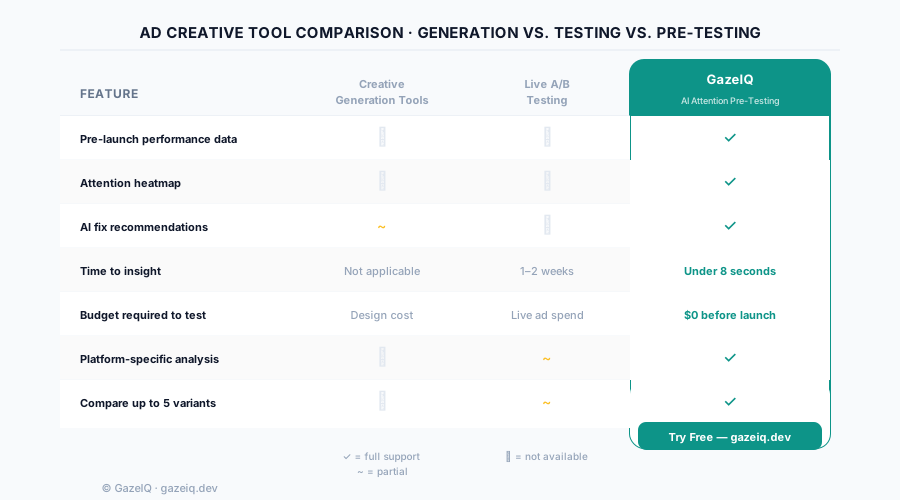
Generation vs. Testing: Two Different Problems
The confusion between adcreative.ai and tools like GazeIQ comes from a category problem. They solve fundamentally different parts of the ad creative workflow:
Creative generation tools
Help you produce ad creatives faster. AI generates images, copy, and layouts from brand assets and templates. The output is more creatives in less time.
Examples: adcreative.ai, Canva AI, Adobe Firefly
Creative testing tools
Help you predict which creatives will perform before you spend. AI analyzes attention, CTA visibility, and composition quality. The output is confidence before launch.
Example: GazeIQ
If you need to produce more creatives—adcreative.ai is built for that. If you need to know which of your creatives will actually get clicks before you spend—GazeIQ is built for that. The strongest workflows use both.
Feature Comparison: GazeIQ vs adcreative.ai
| Feature | adcreative.ai | GazeIQ |
|---|---|---|
| Primary function | AI ad generation | AI creative pre-testing |
| Attention heatmap | ||
| Element-level scoring (CTA, headline, product) | ||
| AI fix recommendations | ||
| Time to performance insight | Not available | Under 8 seconds |
| Platform-specific analysis | ||
| Compare up to 5 variants | ||
| Pre-launch performance score | ||
| Works with any design tool | Templates only |
What adcreative.ai Doesn't Do
adcreative.ai is a production tool. It's good at what it does—generating template-based ad designs quickly. But there's a significant gap between generating an ad and knowing whether that ad will perform. Here's what it doesn't cover:
The Optimal Workflow: Use Both
The highest-performing creative teams don't choose between generation and testing—they use both in sequence:
Generate at scale
Use adcreative.ai (or any design tool) to produce 4–6 creative variants quickly. Don't self-filter at this stage—volume is the goal.
Pre-test all variants with GazeIQ
Upload each variant to GazeIQ. Get attention scores, heatmaps, and element-level visibility scores in under 2 minutes for all 6 variants.
Fix borderline variants
If a variant scores 60–70, apply the specific AI fix recommendation (move the CTA, increase contrast, simplify background). Re-score. Iterate once.
Launch only validated creatives
Put live budget behind the top 2–3 pre-tested variants. Skip the ones scoring below 65—they would have dragged your campaign average down.
Iterate based on live data
Use live CTR and conversion data to inform the next generation cycle. Generate new variants, pre-test them, launch the winners.
Other Creative Testing Tools Compared
Beyond adcreative.ai, there are other tools marketers use for creative analysis. Here's how they compare to GazeIQ:
Meta Ads A/B Test
Live testingGoogle Ads Experiments
Live testingHotjar / FullStory
Website analyticsUserTesting
User researchFrequently Asked Questions
What is adcreative.ai?
adcreative.ai is an AI creative generation tool that helps marketers produce ad images and videos at scale using AI-generated designs. It focuses on generating creative outputs quickly from templates and brand assets. It does not include attention heatmaps, element-level performance scoring, or pre-launch performance prediction.
What is the best adcreative.ai alternative for creative testing?
GazeIQ is the strongest alternative for marketers whose primary need is creative performance testing rather than generation. While adcreative.ai helps you create ads, GazeIQ tells you if those ads will perform—using AI attention heatmaps, element-level scoring, and specific fix recommendations in under 8 seconds per creative.
Can I use GazeIQ and adcreative.ai together?
Yes. Generate creative variants with adcreative.ai, then pre-test those variants with GazeIQ before launching. GazeIQ will identify which generated variants have the strongest attention architecture—so you launch the best-performing creative, not just the one that looks good in preview.