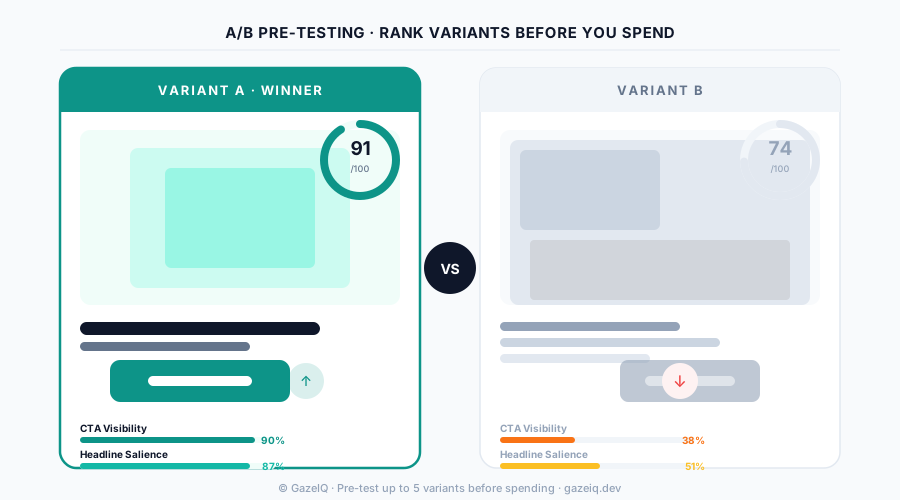
The Problem with Traditional Creative Testing
The standard process for testing ad creatives goes like this: design two or three variants, launch them all with live budget, wait two weeks, pick the winner. It works—eventually. But there are three expensive problems built into this approach.
Every variant that loses cost real money to discover. If Variant B gets 30% of spend and a 0.4% CTR, you paid to learn something you could have found without spending.
Two weeks to statistical significance means two weeks of underperforming creative running. In a fast-moving campaign, that's often the entire flight.
Live A/B testing tells you which variant won—not why. If Variant A loses, you don't know whether it was the headline, the CTA position, the background, or the color contrast.
AI creative pre-testing solves all three. Instead of spending to find out, you analyze before you launch—getting attention data, a performance score, and specific fix recommendations in seconds.
Tool Comparison: How They Stack Up
| Tool | Speed | Cost to test | Feedback type |
|---|---|---|---|
GazeIQ AI Pre-Testing | < 8 seconds | No ad spend | Attention heatmap + AI fix recommendations |
Meta Ads A/B Test Live Testing | 1–2 weeks | Live ad spend required | CTR, CPC, conversion data |
Google Ads Experiments Live Testing | 2–4 weeks | Live ad spend required | Click and conversion lift |
Canva / Adobe Design Tools | N/A (design only) | No performance data | None |
What AI Creative Pre-Testing Actually Does
GazeIQ's creative testing works differently from live A/B tools. Instead of waiting for clicks, it analyzes your creative's visual structure against a model trained on thousands of eye-tracking studies.
Attention heatmap generation
The AI predicts where a viewer's eyes will travel during the first 2–3 seconds of exposure—the window in which 90% of ad engagement decisions are made.
Element-level scoring
Each key element (headline, CTA, product, brand) receives a visibility score (0–100) based on whether it falls in a high-attention or low-attention zone.
Platform-specific analysis
Scoring adjusts for the format you're targeting: a Facebook Feed ad has a different attention pattern than an Instagram Story or a Google Display banner.
Specific fix recommendations
Instead of 'your CTA score is low,' you get: 'Move your CTA 40px higher and increase contrast—it's currently in the bottom 25% of viewer gaze paths.'
Variant comparison
Upload up to 5 variants and compare attention scores side by side. The winner is clear before launch.
When to Use Which Tool
Pre-testing and live testing aren't in competition—they work best in sequence.
Catch attention, CTA, and contrast problems before spending. Eliminate weak variants from 5 down to 2 in minutes.
Test the 2 strongest pre-tested variants against real audiences to confirm which resonates with your specific segment.
Pre-test new creative iterations before replacing winners. Iterate faster without losing momentum from testing cycles.
Diagnose whether the creative problem is attention-based (fixable in a design session) before rebuilding the entire campaign.
What to Look for in a Creative Testing Tool
Not all creative testing tools are built the same. When evaluating options, prioritize these five capabilities:
Frequently Asked Questions
What is an ad creative testing tool?
An ad creative testing tool helps marketers evaluate ad performance before or during live campaigns. Pre-launch tools use AI to predict attention patterns and score creative elements. Live tools run A/B experiments against real audiences. GazeIQ is a pre-launch AI attention testing tool that scores creatives in under 8 seconds without requiring ad spend.
What's the difference between A/B testing and pre-testing for ads?
Live A/B testing shows different variants to real audiences and measures actual clicks—but takes 1–2 weeks and requires live budget. Pre-testing uses AI to analyze attention, contrast, and CTA placement before launch—it takes seconds and costs nothing in ad spend. Best practice: pre-test to eliminate weak variants, then A/B test the top contenders.
How accurate is AI creative testing compared to live testing?
AI attention pre-testing correlates strongly with live performance. Creatives with high attention scores consistently outperform low-scoring ones in live campaigns. GazeIQ's models are calibrated on eye-tracking studies and validated against real CTR data. Pre-testing won't replace all live testing, but it eliminates clearly underperforming variants before they cost you money.