Why Ads Fail: It's Almost Always the Creative
When an ad underperforms, the instinct is to change the audience, increase the budget, or try a different platform. These fixes rarely work—because they address the 30% of performance that targeting and budget control, while ignoring the 70% that creative quality determines.
The specific mechanism: if your creative doesn't capture attention in the first 300 milliseconds of a scroll, viewers never process your offer. If they do stop, but your CTA is in a dead zone, they don't click. No amount of precise targeting compensates for a creative that viewers physically don't see.
Here are the 7 most common creative mistakes we see in our attention data—with specific, actionable fixes for each.
The 7 Creative Mistakes (With Fixes)
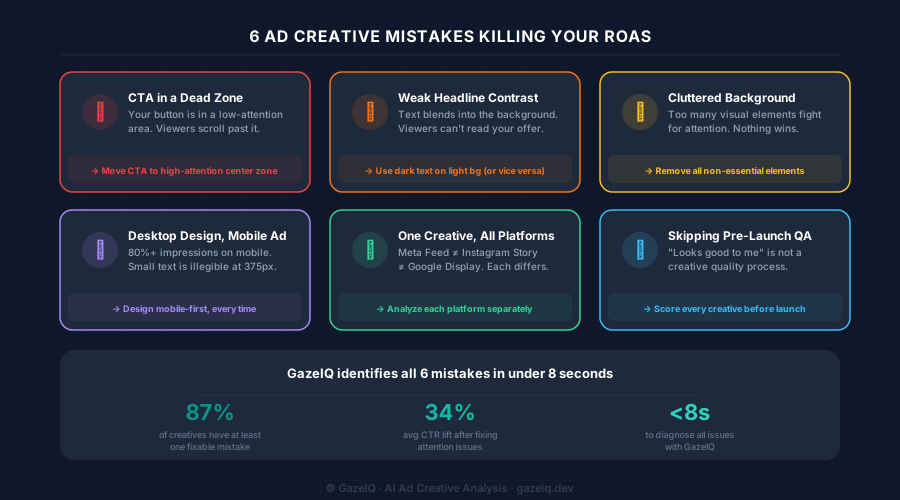
CTA placed in a dead zone
Symptom: Low CTR despite good impressionsEye-tracking research shows viewers follow predictable gaze paths. Corners, bottom edges, and areas below a dominant visual are consistently low-attention zones. If your CTA button lives there, viewers never see it—and never click. In our analysis, 62% of underperforming creatives have CTAs in dead zones.
Fix: Move your CTA to the center or upper portion of the ad where first fixations land. Verify placement with an attention heatmap before launching.
Headline lost in the background
Symptom: High impressions, near-zero engagementText placed over complex image backgrounds loses legibility and salience. Viewers process text subconsciously—if it requires effort to read, they skip it. This is especially damaging on mobile, where font sizes shrink. The rule: your headline needs a minimum contrast ratio of 4.5:1 to be reliably seen.
Fix: Add a subtle dark overlay behind text, increase font size, or reposition text onto a clean solid background section.
Too many visual elements competing for attention
Symptom: Attention spreads thin—nothing convertsEvery element you add to a creative is competing with your CTA for attention. A product, background, logo, headline, sub-copy, price badge, and CTA button—all fighting simultaneously—means nothing wins. Attention scatters across the canvas rather than flowing toward conversion.
Fix: Apply radical simplification. Ask: 'If I remove this element, does the ad still work?' If yes, remove it. The best-performing ads are often the simplest.
Designed for desktop, running on mobile
Symptom: Good performance on desktop campaigns, poor on mobileOver 80% of social ad impressions are served on mobile devices. A creative that looks clear at 1440px often has illegible text, invisible CTAs, and compressed visuals at 375px. Mobile-first design isn't optional—it's the primary context for most ad spend.
Fix: Design your master creative at 375px width. Check that all text is legible at 14px minimum, buttons are at least 44×44px, and critical elements aren't cropped by the platform UI.
Reusing the same creative across all platforms
Symptom: Good performance on one platform, poor on othersMeta Feed, Instagram Story, Google Display 300×250, and Google Leaderboard 728×90 have fundamentally different attention patterns, aspect ratios, and surrounding content contexts. A 1:1 Meta creative repurposed as a 9:16 Story crops the CTA. A Story creative squeezed into a 300×250 banner loses all impact.
Fix: Analyze each variant in its target platform context. GazeIQ provides platform-specific heatmaps for each major ad placement.
Product is not the dominant visual
Symptom: Ad recalled, but purchase intent lowIf viewers see your brand and background art but don't clearly see the product, you've paid for awareness without purchase consideration. The product (or the transformation it delivers) needs to be the undisputed focal point. Decorative elements, lifestyle photography, and brand assets should support the product—never compete with it.
Fix: Use attention heatmap data to verify that the product occupies the primary red zone in your creative. If it doesn't, adjust crop, composition, or scale.
Launching without any creative quality check
Symptom: Consistently variable results with no clear pattern'Does this look good?' is a subjective review with weak correlation to actual CTR. Gut-feel creative QA produces inconsistent results because individual aesthetic preferences don't predict audience attention patterns. Teams that measure creative quality before launch get predictable, repeatable improvements.
Fix: Establish a minimum attention score threshold (e.g., 70/100 in GazeIQ) that all creatives must pass before going live. Make this a non-negotiable part of your creative workflow.
How to Diagnose Which Mistake You're Making
The challenge with most creative mistakes is that they're invisible without attention data. A creative can look polished, pass your internal review, and still have a CTA that 85% of viewers never see.
Upload to GazeIQ
Drop your live or draft creative into GazeIQ's scanner.
Read the heatmap
See which zones are red (seen) vs. blue (ignored). Check where your CTA, headline, and product land.
Apply AI fixes
Get specific, creative-level recommendations—not generic advice—and re-test before launch.
Frequently Asked Questions
Why are my Facebook ads not performing?
The most common reasons Facebook ads underperform are creative-related: CTA placed in low-attention zones, low headline contrast, cluttered backgrounds, or wrong format for mobile. Creative quality drives ~70% of campaign performance, so even perfect targeting can't compensate for a poor creative.
Why do my ads have low CTR?
Low CTR most often means viewers are scrolling past your ad without registering the CTA or value proposition. This happens when key elements (headline, CTA button, product) are in low-attention zones. An attention heatmap reveals exactly which elements are being missed.
How do I fix an underperforming ad creative?
Run an attention heatmap to see where eyes go and what's being missed. Check CTA visibility (is the button in a high-attention zone?). Check headline contrast and size. Simplify the background. Re-test the revised creative before launching. GazeIQ completes this diagnosis in under 8 seconds.
Do ad creative mistakes affect ROAS?
Directly, yes. Creative quality accounts for ~70% of campaign performance variance. A creative with an invisible CTA will have low CTR, which increases CPC and reduces ROAS—regardless of how good your targeting or offer is.
Continue reading