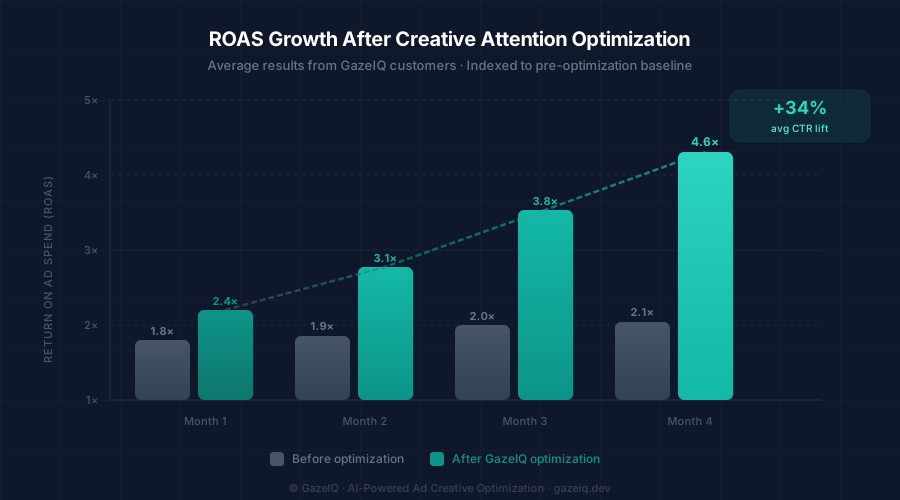
Why ROAS Plateaus—and What's Actually Causing It
You've refined your audiences, optimized your bids, and tested different offers. But ROAS stays stubbornly flat. Sound familiar?
Here's why: most paid advertising teams spend the majority of their optimization energy on targeting and bidding—the variables that ad platforms make easiest to adjust. But creative quality accounts for approximately 70% of campaign performance variance, according to Nielsen research. That means if your creative isn't capturing attention correctly, no amount of targeting refinement will move the needle.
The good news? Creative quality is now measurable before you spend. AI attention models can predict where viewers look on your ad with 0.91 correlation to lab eye-tracking data—giving you the data to optimize before a single dollar is committed.
The Attention → Click → Conversion Chain
Every conversion starts with attention. Before a viewer can click your CTA, they have to see it. Before they process your value proposition, their eyes have to land on your headline. The sequence is: Attention → Comprehension → Action. Break any link in the chain and you lose the conversion.
Eye-tracking research shows that viewers make their first fixation within 300 milliseconds of an ad appearing. In that first fixation sequence (typically 2–4 gaze points), they decide whether to continue processing or scroll past. If your CTA or key message isn't in those first fixation zones, it functionally doesn't exist for that viewer.
The CTA Dead Zone Problem
In our analysis of 1,000+ ad creatives, 62% had CTAs placed in low-attention zones—areas where gaze rarely reaches in a normal scroll pattern. These ads consistently underperform not because of budget or audience, but because viewers literally never see the action prompt.
5 Root Causes of Low ROAS (All Creative-Related)
CTA button in a dead zone
Your call-to-action must be placed where gaze naturally arrives after processing your headline and product. Bottom-right corners and small floating buttons are notorious dead zones in mobile feed scroll patterns.
Weak headline contrast
Text placed over complex image backgrounds loses salience. If the headline requires effort to read, viewers skip it. High-contrast backgrounds with clear type—or text overlays with strong contrast ratios—are mandatory.
Product not dominant
Your product should be the most visually prominent element. If decorative elements, logos, or background imagery compete for dominance, attention scatters—and your key message competes against itself.
Desktop design on mobile placements
Over 80% of social ad impressions are mobile. Design for 375px viewport width first. Small text, fine detail, and edge-to-edge imagery often fail completely at mobile scale.
One creative across all platforms
Meta Feed, Instagram Story, and Google Display have fundamentally different attention patterns. A single creative repurposed across all formats will underperform on most of them.
The 4-Step Framework to Increase ROAS with Attention Data
Map attention
Upload your creative and get an AI heatmap in <8 seconds. See exactly where eyes land.
Diagnose gaps
Identify which elements (CTA, headline, product) are in cold zones and missing attention.
Apply AI fixes
Get specific, actionable recommendations tied to your creative's actual attention data.
Pre-test variants
Compare 2–5 revised versions by attention score and ship only the winner.
This framework compresses what traditionally takes 2 weeks of live A/B testing into a 20-minute pre-launch review session. By only promoting pre-tested winners, you eliminate the budget waste of live split testing on creatives you could have disqualified before spend.
Platform-Specific ROAS Optimization Tips
Meta (Facebook & Instagram Feed)
- Lead with a face or product close-up—faces trigger immediate gaze fixation
- Keep text under 20% of the image area for best delivery
- Place CTA text/button in the upper-center or center-left zone
- Use 1:1 square format as your primary format—it takes more screen real estate
Google Display
- High contrast between ad and white publisher backgrounds stops the eye
- For 300×250: value prop in top half, CTA in bottom third
- For 728×90 leaderboard: left-anchor logo + headline, right-anchor CTA
- Avoid gradient text—legibility drops dramatically at display sizes
Measuring ROAS Improvement: What to Track
After implementing attention-based creative improvements, track these metrics over a 2–4 week window:
CTR
Primary indicator. Should increase within 3–5 days of launching optimized creative.
CPC
Lower CTR costs lead to lower CPC, directly improving ROAS without changing bids.
Conversion Rate
Attention-optimized landing-page creatives also improve post-click engagement.
Further reading